Managing the visual assets for a single corporate event is a significant undertaking. When that scale expands to dozens of events across multiple departments or global office locations, the complexity of collecting, organizing, and utilizing those assets increases exponentially. Traditional methods of photo collection, such as shared cloud folders or email attachments, often fail at enterprise scale. They are either too difficult for guests to use, resulting in low participation, or they create a massive administrative burden for the marketing and HR teams tasked with sorting through the results.
For organizations looking to build a consistent brand narrative through event content, the solution lies in a centralized, multi-event platform. A robust strategy allows a company to maintain a bird’s eye view of all corporate activities while giving individual event leads the autonomy to manage their specific galleries. This approach ensures that whether it is a product launch in New York or a team building day in London, every valuable moment is captured and stored in a high quality, professional format.
The Shift to Multi-Event Management
Corporate event calendars are often packed with diverse activities. There are external facing events like trade shows and client dinners, alongside internal initiatives like town halls and holiday parties. The goal of a modern enterprise is to treat these events not as isolated dates on a calendar, but as a continuous stream of content that fuels brand authority and internal culture. This is where GUESTPIX for business provides the necessary infrastructure to manage high volumes of content without the typical technical friction.
Centralized management means that a head of marketing can oversee multiple galleries from a single dashboard. They can track upload volumes, monitor content for brand compliance, and ensure that assets are being collected uniformly across the organization. This level of oversight is essential for maintaining a professional standard and ensuring that no valuable milestones are lost to the “black hole” of personal smartphones.
Frictionless Collection with QR Code Sharing
The most common reason corporate photo collection fails is friction. If an employee or a client has to download an app, create an account, or verify an email address just to share a photo, they simply will not do it. In a professional setting, time is a currency, and guests are unlikely to spend it on a complicated upload process.
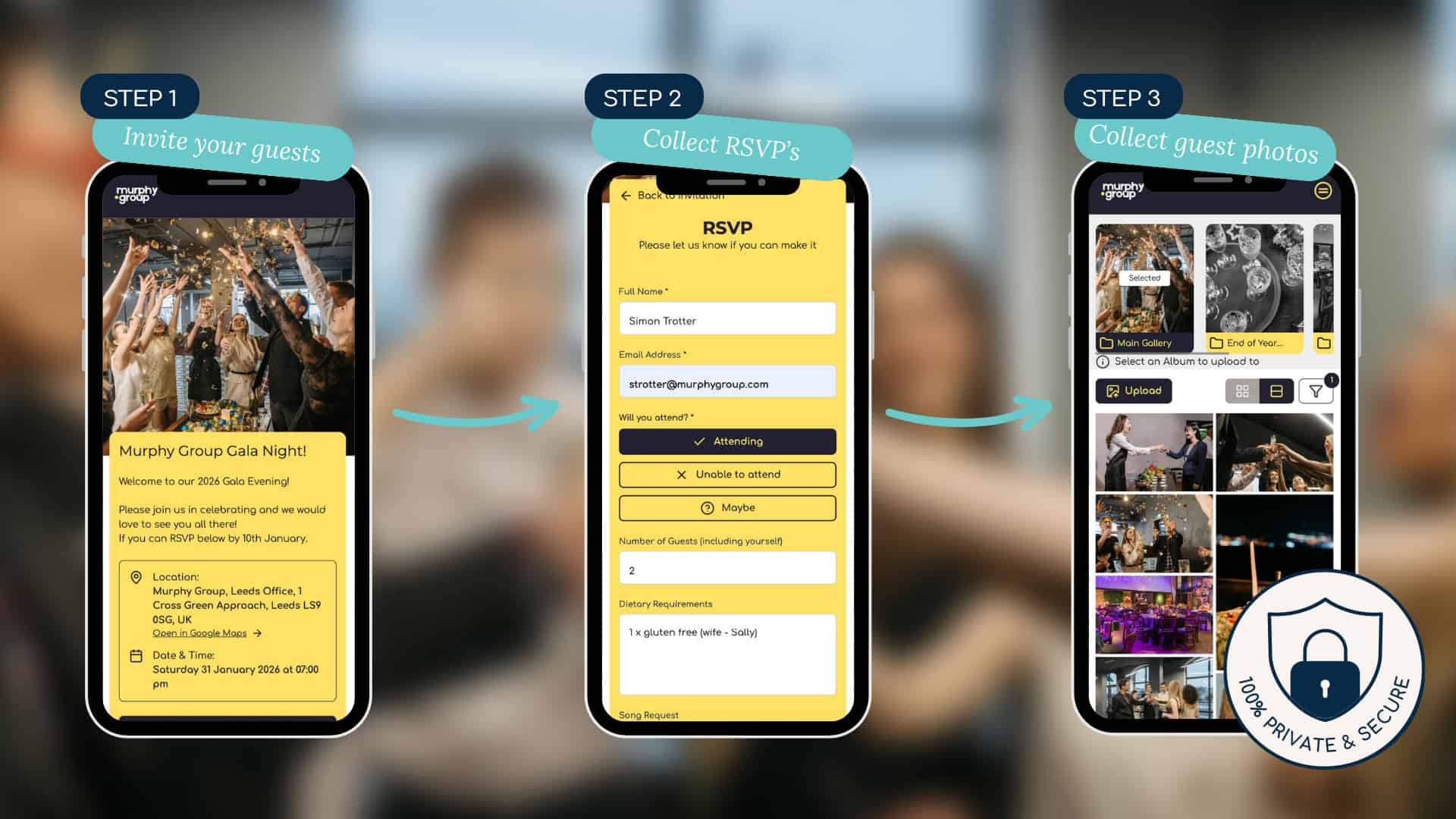
GUESTPIX solves this by utilizing a browser-based, QR code-driven system. There are no apps to download and no registrations required. An attendee simply scans a QR code with their native camera app and is immediately taken to the event gallery where they can upload photos and videos instantly. This ease of use is why a QR code for event media captures team milestones effortlessly, ensuring that the participation rate remains high regardless of the venue or the guest profile.
For multi-event management, this means unique QR codes can be generated for every specific session, booth, or location. At a large scale conference, you might have one code for the keynote hall and separate codes for individual breakout rooms. This automatically categorizes the content at the point of capture, saving hours of manual sorting later.
High Quality Assets for Professional Use
Social media platforms and messaging apps often compress images, making them unsuitable for professional marketing materials or large scale printing. A corporate event photo platform must prioritize high resolution downloads. When managing multiple events, having a central repository of original quality files allows the creative team to pull assets for annual reports, recruitment brochures, or high definition video recaps without worrying about pixelation or artifacts. For a deeper look at these requirements, refer to our corporate event photo sharing guide.
Organizing Multi-Galleries Across Departments
In a large organization, different departments have different needs for event content. The HR team focuses on “life at the company” to aid in recruitment. The Sales team needs photos of client interactions and booth traffic. The Marketing team needs polished shots for social proof. Managing these varying needs requires a structured multi-gallery approach.
By setting up distinct galleries for different departments, you prevent the overlap of content and ensure that the right people have access to the right assets. A global office structure can also benefit from this organization. A regional manager in Singapore can manage their local office opening gallery while the global HQ in Chicago maintains administrative access to pull content for the company-wide newsletter. This hierarchy is a core component of how the business platform works, providing both flexibility and control.
Custom Branding and Consistency
When guests scan a QR code at a corporate event, the digital experience should feel like an extension of the brand. Multi-event management allows for consistent branding across every gallery. You can upload company logos, set brand colors, and customize the welcome messaging. This ensures that whether a guest is at a small department lunch or a massive gala, the interface remains familiar and professional. This consistency builds trust and reinforces the company’s attention to detail.
The Corporate Video Guestbook: Building Global Culture
Static photos are powerful, but video content offers a level of engagement that images cannot match. One of the most effective ways to use GUESTPIX in a corporate setting is through the Video Guestbook. This feature allows attendees to upload short video clips: perhaps a testimonial, a quick “congratulations” to a retiring executive, or a “hello” from a remote office location.
At the end of an event, or a series of events, these clips can be compiled into a high quality montage. This is particularly effective for global organizations that want to bridge the gap between distant offices. Imagine an annual general meeting where a three minute video plays, featuring clips from employees in every time zone. It creates a sense of unity and shared purpose that a simple slideshow cannot achieve. Because the platform handles the collection and storage, the marketing team can focus on the creative edit rather than chasing down file transfers from twenty different sources.
The Written Guestbook and Data Collection
Event photos are often viewed as purely creative assets, but there is a significant data component that can be leveraged, especially in a B2B context. The Written Guestbook feature allows guests to leave text-based messages, feedback, or even contact information. This transforms the photo sharing gallery into a multi-functional tool for engagement and lead generation.
For trade shows and exhibitions, this is a game changer. You can encourage booth visitors to take a photo with a new product and leave a comment about what they liked. This creates a library of social proof and a list of leads that can be downloaded as a CSV file and imported directly into a CRM. Our article on trade show photo sharing explains this process in detail. When managing multiple trade shows throughout the year, this systematic approach to lead capture ensures that the sales team has a consistent flow of data from every appearance.
Gathering Employee Feedback
Internally, the Written Guestbook acts as a streamlined feedback loop. After a corporate retreat or a training seminar, employees can leave their takeaways alongside their photos. Because the process is so quick and is already open on their phone for photo sharing, the response rate is typically much higher than a separate email survey sent three days later. The ability to export these messages as a CSV makes it easy for HR leads to analyze sentiment and report on event ROI to senior leadership.
Security, Privacy, and Enterprise Requirements
Data security is a non-negotiable requirement for any enterprise-grade software. When managing multiple corporate events, you are often dealing with sensitive internal culture or client interactions that must remain private. Public social media hashtags are not a viable option for corporate events because they offer zero control over who sees the content or how it is used.
A dedicated platform provides a “walled garden” approach. Access to the gallery is controlled by the QR code or a private URL. The company owns the data, and the content is not indexed by search engines or sold to third-party advertisers. Furthermore, having the ability to delete individual photos or entire galleries after a project is complete ensures that the organization remains compliant with data retention policies and GDPR requirements.
Storage and Retrieval at Scale
Managing twenty events a year can result in thousands of files. A common pain point for event planners is the “where did we put those photos?” question six months after the fact. A multi-event dashboard acts as a permanent archive. Each event is neatly filed, dated, and named. This makes retrieval simple: if the social media manager needs a photo from the “2024 Tech Summit” for a “throwback Thursday” post, they can find it in seconds rather than digging through old hard drives or expired Wetransfer links.
Strategic Use Cases for Multi-Event Platforms
To maximize the value of a multi-gallery setup, organizations should look at specific use cases across their various functions:
- Internal Communications: Use monthly galleries for office culture. Encourage employees to share “desk shots,” office pets, or team lunches. This creates a living document of the company’s day-to-day life.
- Recruitment Marketing: Show prospective hires what it’s actually like to work at the company. Real, unpolished (but high quality) photos from events are much more persuasive than staged stock photography.
- Investor Relations: High-res galleries of facility tours, site visits, or major milestones provide visual evidence of progress and operational excellence for stakeholders.
- Brand Activation: For consumer-facing brands, managing galleries across multiple pop-up locations allows the marketing team to see which activations are generating the most buzz in real time.
Implementation: Rolling Out to the Whole Organization
Starting with a multi-event platform is a straightforward process, but it requires a bit of internal coordination to ensure success. The first step is defining the administrative roles. Decide who will have the global “owner” access and who will be “event leads” for specific galleries. Often, a marketing coordinator acts as the owner, while department heads or office managers are given the keys to their specific events.
Next, standardize the physical presence of the QR codes. For a consistent experience, the codes should be integrated into the event signage, table cards, and digital presentations. Providing a brief “How to Share” slide at the start of a meeting or including the QR code on the back of employee lanyards ensures that everyone knows where to go. Because the system is browser-based, there is no need for a technical support desk to help people download an app, which significantly reduces the friction for the on-site team.
Measuring Success Across Multiple Events
The final piece of the multi-event puzzle is reporting. By looking at the analytics across all galleries, you can determine which types of events drive the most engagement. You might find that “Lunch and Learns” have a 90 percent participation rate, while “Awards Nights” generate fewer photos but higher quality video testimonials. This data allows you to refine your event strategy for the following year, focusing your resources on the activities that provide the most significant content and cultural value.
In summary, the transition from managing single event photos to an enterprise-wide multi-event strategy is a hallmark of a mature brand. It moves the organization away from chaotic, manual processes and toward a streamlined, secure, and professional system. By leveraging QR code technology, video montages, and structured data collection, a company can ensure that every investment made into their corporate events pays dividends in the form of high quality, actionable content for years to come.