

There is nothing worse than spending weeks planning your wedding reception only to find out half your guests never confirmed whether they are coming. You need accurate numbers for the caterer, the venue, and the seating chart. A wedding RSVP QR code solves that chaos completely.
Guests scan a code printed on your invitation, fill out a beautiful mobile form, and you get real-time confirmation. No phone tag. No spreadsheets. Just clarity.
Why a QR Code RSVP Beats the Old Way
Traditional RSVPs rely on paper reply cards, mailed back at their own pace. Some guests lose them. Others forget. You end up calling people on the phone, chasing down answers, and guessing at your final headcount three days before the wedding.
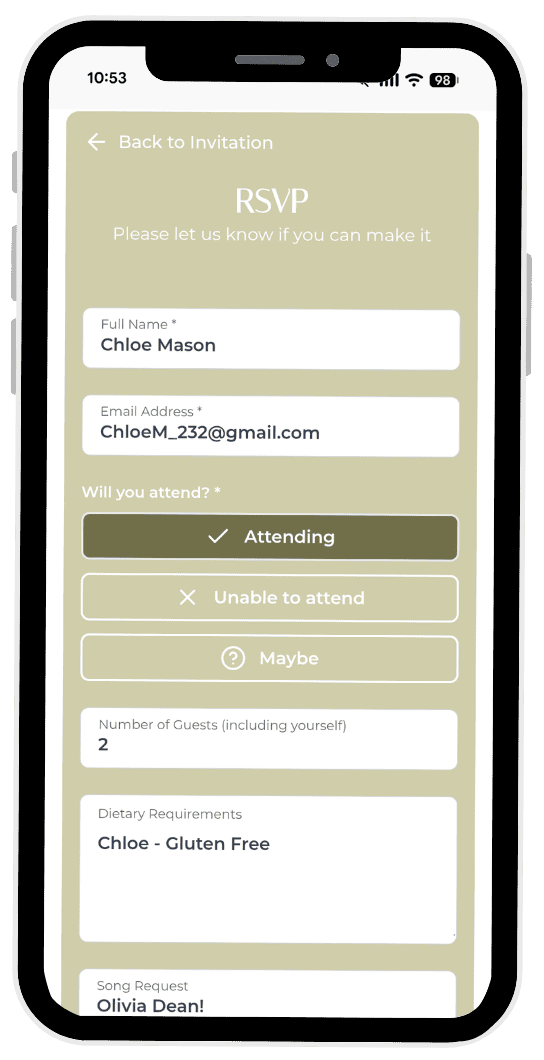
A digital wedding RSVP puts the ball in your guests’ court while keeping everything beautifully organized on your end. The QR code links to a simple mobile form where guests enter their name, confirm attendance, add plus-ones, note dietary requirements, and even submit song requests for the dance floor.
Every response lands in one dashboard. You can see who has replied, who has not, and get a live headcount that updates the moment a guest submits their details.
How to Set Up Your Wedding RSVP QR Code
Step 1: Create Your RSVP Form
Start by building a mobile-friendly RSVP form. Keep the fields clean and focused. Ask for the guest name, attendance confirmation, meal choice, dietary restrictions, and plus-one details. If your guests love music, add a field for song requests. Everything they submit organizes itself automatically. You do not need to upload a spreadsheet or manually type anyone in.
Step 2: Generate Your QR Code
Your platform provides a unique QR code that links directly to your RSVP form. Download it in a high-resolution format so it prints crisply on your invitation suite. Place it prominently on your invite card or include it on a separate insert with a simple line of copy, such as “Scan to RSVP.”
Step 3: Design Your Invitation
Your QR code should feel like a natural part of your stationery, not an afterthought. If you are already sending digital wedding invitations, the QR code integrates seamlessly into the design. For printed invites, position the code where guests will notice it without cluttering your overall aesthetic.
Step 4: Track Responses in Real Time
This is where the real magic happens. Instead of counting reply cards in a shoebox, you get online RSVP tracking that updates live. Log into your dashboard anytime to see exactly who confirmed, who has not responded, and what meal choices your guests selected. Run a quick export if your caterer needs a spreadsheet by Friday afternoon.
What Makes a QR Code RSVP Actually Work
Zero Friction for Your Guests
Your guests should never need to download an app or create an account. They scan the code, see a clean form on their phone, type in their answers, and hit submit. That entire process takes less than a minute. The smoother the experience, the faster you get your responses.
Security and Privacy That Protects Your Guests
Your guest list contains personal information. Names, phone numbers, dietary details. That data deserves state-of-the-art cyber security. A trustworthy platform encrypts everything and keeps your guest information private. You should never have to question whether your loved ones’ data is safe. Read more about keeping your wedding photos private and the rigorous standards we apply across our entire platform.
Real Support When You Need It
Weddings are stressful enough without worrying about whether your RSVP system will hold up. Choose a platform backed by a dedicated professional team. The best services provide 7-day support, monitoring events globally so you can reach someone whenever a question pops up. Whether it is Tuesday morning or Saturday evening before your rehearsal dinner, help is available.
RSVP QR Codes Beyond the Wedding Day
A QR code RSVP system works beautifully for other milestones too. Engagement parties, bridal showers, anniversary celebrations, and rehearsal dinners all benefit from the same simple scan-and-confirm approach. Many couples also use their invitation hub to answer registry questions or direct guests to curated wedding gift ideas so everyone knows what to bring. Once you set up your account, creating new RSVP forms for future events takes just a few clicks.
And once the big day arrives, your work is not done. A good wedding photo sharing app lets every guest upload the photos they took, giving you a complete collection from every angle. If you need inspiration, check out our guide on how to collect wedding photos with QR codes. The same QR code approach that collected your RSVPs can collect your memories.
FAQ
Do guests need a special app to scan the QR code?
No. Every modern smartphone has a built-in camera that reads QR codes automatically. Guests scan with their phone camera, tap the link that appears, and fill out the form in their browser. Zero downloads required.
What if a guest does not have a smartphone?
Your RSVP platform should offer a backup. Most provide a magic link you can text or email, along with a traditional paper reply option for older relatives who prefer the classic approach.
How many responses can the system handle?
There is no practical limit. Whether you are hosting an intimate gathering of 30 or a grand celebration of 300, every response organizes itself in your dashboard.
Ready to ditch the reply cards and get your guest list sorted?
Start collecting RSVPs and guest photos with our free photo sharing app. No credit card. No setup hassle. Just scan, respond, and share.
Frequently Asked Questions
How do I create a QR code for my wedding RSVP?
+
You can create a wedding RSVP QR code by generating a digital event on GUESTPIX. You receive a custom QR code that directs guests straight to your online RSVP and invitation page. Print the code onto your paper RSVP enclosure cards, wedding website, or digital stationery for effortless guest responses.
Should you put an RSVP QR code directly on wedding invitations?
+
Putting a QR code on wedding invitations or RSVP cards significantly speeds up response times. Guests can scan the code and submit their attendance in less than 30 seconds rather than filling out paper cards and visiting a post office.
Can older wedding guests easily use an RSVP QR code?
+
Yes, all modern iPhone and Android devices have native QR code scanners built directly into the camera app. Guests simply point their camera at the code and tap the link that appears on screen, without installing any third-party apps.